
Knowing how to make your home a smart home can feel overwhelming at first, but the process is more straightforward than you might think. This guide walks you through every step so you can build a smarter, more connected home with confidence.
A smart home gives you greater control over your comfort, energy use, and security. The right smart home upgrade saves you time, reduces costs, and makes daily life easier. This guide covers everything from building a strong network foundation to integrating real-time weather data so your home works for you around the clock.
Start With A Strong Smart Home Foundation
Making a smart home starts before you buy a single device. Your home network is the backbone of everything, and without a reliable Wi-Fi connection, even the best smart devices will underperform. Before adding any new technology, assess your current setup and identify where it falls short.
Here is what to prioritize:
Coverage: If your signal drops in certain rooms or doesn’t reach your backyard, your smart devices will struggle, too. A mesh Wi-Fi system extends coverage evenly and eliminates dead zones.
Speed: Automations, real-time data, and streaming all run simultaneously. Look for Wi-Fi 6 support for the best performance across multiple connected devices.
Security: Use WPA3 encryption, change default passwords, and consider setting up a dedicated network just for your smart devices.
A few network upgrades now will prevent a lot of frustrating troubleshooting later. Get the foundation right, and every smart home addition you make from here will be easier to set up, more reliable, and more effective.
Choose A Central Hub To Connect Everything
One of the most important smart home additions you will make is choosing a central hub. It connects and coordinates all your devices so they communicate as a single system rather than a collection of separate apps. Without a hub, making a smart home that actually feels seamless is nearly impossible.
The three most common platforms are Amazon Alexa, Google Home, and Apple HomeKit. Alexa works with a wide range of third-party devices and is a strong choice for most households. Google Home integrates well with Android devices and Google services. Apple HomeKit is built for iPhone and Mac users who want a polished experience within the Apple ecosystem.
Your choice should be based on what you already own and how you plan to use the system day to day. Choosing your hub early gives you a clear compatibility checklist for every purchase that follows and sets the stage for every smart home idea you want to bring to life.
Already have a hub? See how the Tempest Weather Station integrates with the platforms you use most.
Upgrade Your Lighting For Comfort And Efficiency
Smart lighting is one of the most impactful smart home upgrades you can make, and one of the easiest to start with. You gain the ability to schedule lights, adjust brightness, change colors, and automate it all without lifting a finger.
Start with the rooms you use most, your living room, bedroom, and kitchen. From there, features like these make a real difference:
- Scheduling: Set lights to brighten gradually in the morning, dim in the evening, and shut off automatically at bedtime.
- Occupancy Sensors: Lights turn on when you enter a room and off when you leave, so you never waste energy on an empty space.
- Color and dimming control: Adjust the ambiance for movie nights, work from home, or winding down without getting off the couch.
Start with one or two rooms, get comfortable with the controls, and expand gradually. Small energy savings add up over time, and a well-planned lighting setup makes your home more comfortable and efficient without any extra effort.
Make Your Home Smarter With Voice Control
Voice control is one of the smartest house ideas you can put in place right away. With a simple phrase, you can turn off every light, check outdoor conditions, set a timer, or lock the front door without stopping what you are doing.
Voice assistants like Alexa, Google Assistant, and Siri connect to your hub and respond to natural language commands. No apps to open, no specific phrasing to memorize. The real power comes from pairing voice control with automated routines. Say “goodnight” and your lights dim, your thermostat adjusts, your doors lock, and your alarm sets, all at once.
Voice control also improves accessibility for anyone whose hands are frequently occupied or who has mobility challenges. It is one of those smart home additions that starts as a convenience and quickly becomes something you rely on every day.
Automate Your Climate For Year-Round Comfort
A smart thermostat is one of the most effective smart home upgrades you can make. Heating and cooling account for a large share of home energy use, and smart thermostats reduce those costs without sacrificing comfort by learning your habits and automatically adapting to your schedule.
Getting started is simple:
- Install a compatible device
- Connect it to your network and hub
- Set a basic schedule.
Most thermostats begin learning your preferences from there. Add geofencing, and your thermostat will detect when you are heading home and start adjusting the temperature before you walk in the door. The next level is connecting your thermostat to real-time outdoor weather data. When your system knows a cold front is rolling in or temperatures are dropping faster than expected, it responds ahead of time and keeps your home exactly where you want it without any manual input from you.
Enhance Security With Smart Monitoring Systems
A strong security setup is one of the most valuable smart home additions you can invest in. Smart cameras, video doorbells, and contact sensors give you a live view of your property at any time and alert you the moment something unusual happens.
Start with your entry points. Covering your front door, back door, garage, and ground-level windows gives you the most complete picture of what is happening around your home. From there, look for these key features in any device you choose:
- Real-time alerts sent directly to your phone
- Two-way audio so you can communicate remotely
- Night vision and motion-triggered recording
- Direct integration with smart locks for remote access
When your security devices connect to the rest of your smart home system, the protection multiplies. A single motion event can trigger lights to turn on, cameras to start recording, and an alert to hit your phone all at the same time.
Use Real-Time Environmental Data To Drive Smarter Decisions
Knowing how to make your house a smart house goes beyond controlling devices. A truly smart home responds to what is actually happening in its environment. Indoor air quality monitors, humidity sensors, and temperature stations provide your home with the data it needs to protect your health, comfort, and the structure itself.
Why this matters day to day:
- Humidity: High indoor humidity can lead to mold growth and poor air quality. Too low, and you are dealing with dry air that affects your health and can damage wood floors and furniture.
- Air quality: Sensors detect pollutants, allergens, and rising CO2 levels. When readings climb, your system can automatically increase ventilation or activate air purifiers.
- Outdoor conditions: Connecting indoor data with outdoor conditions lets your home respond proactively before indoor conditions change.
These automated responses are what separate a smart home from a genuinely intelligent one.
Want to go deeper? Explore the advantages of smart home technology and see how environmental awareness improves every part of daily life.
Create Custom Routines That Simplify Daily Life
Custom routines are the glue that holds all of your smart home additions together. A routine is a set of automated actions triggered by a time, your location, or a specific event. Instead of controlling each device individually, a single trigger sets off a chain of responses throughout your home.
A few routines worth building right away:
- Morning: Lights brighten gradually, the thermostat rises, and your coffee maker turns on before you get out of bed.
- Evening: Lights dim, doors lock, thermostat lowers, and security cameras activate as the household winds down.
- Away mode: When your phone detects that you have left, the lights turn off, the thermostat switches to an energy-saving mode, and your security system arms automatically.
Start with one or two routines that solve your biggest daily friction points, test them for a week, and refine as you go.
New to this side of making a smart home? Read our beginner’s guide to leveraging weather data in a smart home to see how real-world data makes your routines even smarter.
Integrate Weather Information Into Your Smart Home Tech With The Tempest Weather System
Every smart home upgrade in this guide becomes more powerful when connected to what is happening outside. That is the idea behind the Tempest Weather System, a complete weather solution designed specifically for your home.
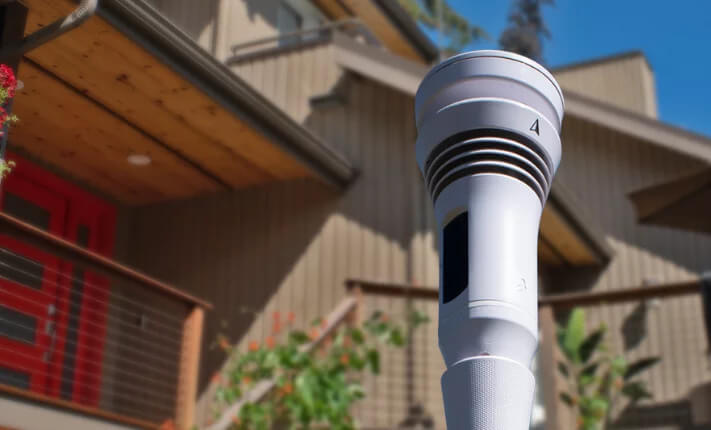
At the center of it is the Tempest Weather Station, a no-moving-parts personal weather station that installs in minutes and delivers hyperlocal, real-time readings directly to your phone. Temperature, humidity, wind speed, rainfall, lightning, UV, and more are all measured from your exact location, not a regional station miles away. That precision is what makes your smart home truly responsive to the world around it.
Whether you are just getting started with smart house ideas or looking to take an existing setup further, the Tempest Weather System is the upgrade that ties it all together. Explore the Tempest Weather System or shop the Tempest Weather Station today and start building a home that knows what is coming before it arrives.